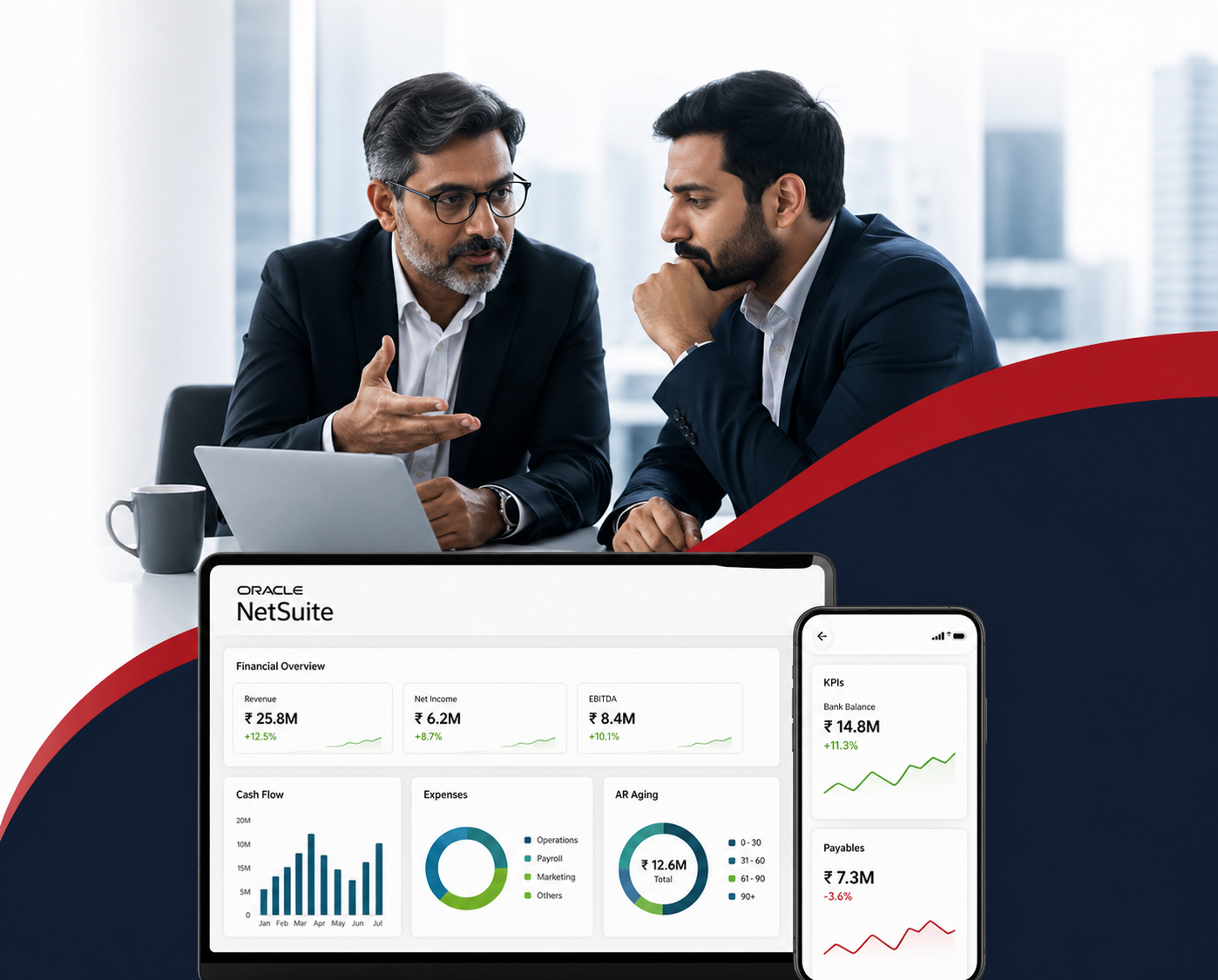

NetSuite continues to grow and remains one of the most flexible cloud-based ERP solutions available. Knowledge of NetSuite Pricing 2026 is vital for businesses planning their digital transformation journey. While the pricing still follows a subscription model, costs are influenced by factors such as licenses, modules, and integrations used during implementation. This article provides insights into the current pricing structure and explains how costs can be calculated using the pricing calculator.
Organizations opt for NetSuite for comprehensive management of all key business processes in a single system. The spectacular aspect of using NetSuite’s services is that it does not have any hidden charges. You don’t have to
1. Pay large license fees
2. Pay any fee upfront
3. Pay any maintenance fee too
Companies these days opt for NetSuite as it reduces operational costs. Moreover, the competitive advantage of their product or service counterparts is strengthened by cloud-based automation.
NetSuite pricing differs from other enterprise resource planning software, as it depends on the modules and several other factors. Instead of a fixed price list, organizations receive a customized quote based on their complexity and number of users. This pricing guide on NetSuite ERP covers key cost factors, including licenses, modules, implementation, and contracts, to help you plan your budget effectively.
NetSuite is a simple system that does not confront any software or hardware challenges for its customers. NetSuite helps organisations of any size and niche. Ideally, it helps organisations to
1. Manage the inventory system
2. Track accounts and finance
3. Maintain CRM
4. Host e-commerce stores
Understanding NetSuite Price Plans
NetSuite’s pricing strategy is based on a flexible subscription plan that allows businesses to grow according to their business requirements. Unlike other ERP systems that offer fixed packages, businesses can create their own investment plan according to their needs for platform access, users, and functionalities.
Major Factors that Affect This:
Platform Subscription
This refers to the basic ERP platform that allows businesses to have access to their financial and operational capabilities. This begins with a basic subscription plan and increases according to business size and complexity.
User Licenses
NetSuite’s pricing depends on the access level of each user. Full-access users cost more than limited-access users, such as employees entering expenses or timesheets. This approach ensures businesses only pay for the level of functionality each user requires.
Add-on Modules
Business entities can expand their ERP platform by using add-on modules such as inventory management, manufacturing management, and analytics management. NetSuite’s modules pricing strategy varies according to their functionalities and configuration requirements.
NetSuite Implementation Services
Businesses need professional implementation services when starting with an ERP platform. NetSuite Implementation cost depends on the project requirements and the complexity of the business.
Also Read: NetSuite Pricing Management: Step-by-Step Guide for Item Pricing Setup
NetSuite Pricing Based On Suite
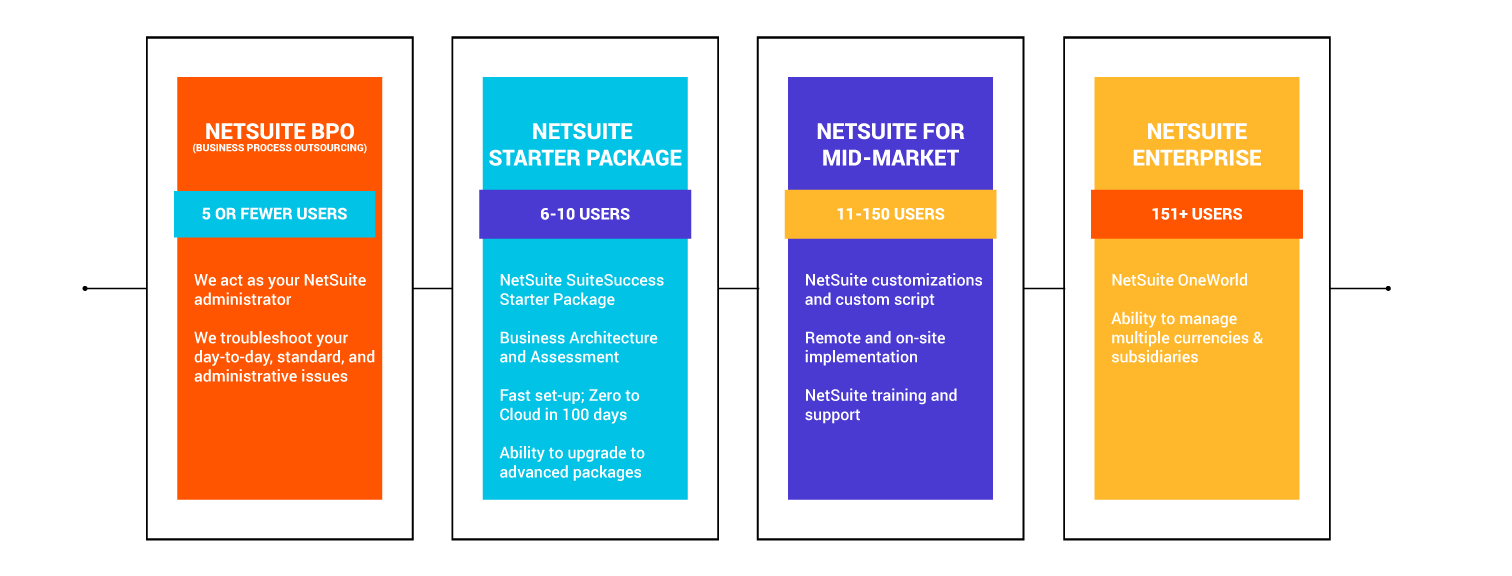
This will be the first step your consultant might suggest to you. The base package, called a Suite, can be selected depending on the size of your organisation. The customer base is not required for this selection. NetSuite offers packages for businesses that are of any size. NetSuite suites come in three editions: NetSuite Limited Edition, NetSuite Mid-Market Edition, and NetSuite Enterprise Edition. NetSuite ERP pricing depends primarily on these three choices.
- NetSuite Limited Edition: NetSuite Limited Edition is priced for small businesses and is ideal for enterprises not requiring more than 10 user licenses and enterprises with less than 50 staff.
- NetSuite Mid-Market Edition: NetSuite Mid-Market Edition is priced for mid-category enterprises not requiring more than 10 licenses and has one or more legal entities.
- NetSuite Enterprise Edition: NetSuite Enterprise Edition is priced for large companies requiring more than 1,000+ licenses.
You can select the Suite as per the number of user licenses. Or, with the size of the organization, you can determine which package to opt for. All the 3 packages that you find are similar to one another in two aspects
1. Basic Codes
2. Deployment
This means you can be flexible with your package. You can upgrade at any time as the licenses or the size of the organization increase. All you have to do is change the subscription, and you shall get to see a seamless transition in this process.
Also, one need not worry about migration in terms of systems as well. If the package changes, only the pricing changes and nothing else.
As said earlier, the features and functions remain the same in all three editions.
Let us See What Functions These Packages Offer You
NetSuite Customer Relationship Management Contains
1. Partnership Relationship Management (PRM)
2. Case Management Services
3. Marketing Automation
4. Salesforce Automation (SFA)
The NetSuite Enterprise Resource Planning Contains
1. A General Ledger
2. Receivable and Payable Accounts
3. Credit Cards, ACH, and EFT Acceptance
4. Management of Banks and Reconciliations
5. Multi-currency as well as Multi-Language Support
6. Inventory Management
7. Basic Project Management
8. Order and Purchase Management
9. Employee Center TheThe The
General Ledger in the ERP tracks all the financial transactions. If you are planning to generate financial statements for your organization, then this is the one that does the task. Right from the Income statement to the Balance sheet, the GL has several blocks that help generate the statements in a quick time.
Learn How to Set Up NetSuite the Right Way
Step 1: Choose the right package for your business
NetSuite User License Pricing
It is a usual practice for the ERP development services to always have either concurrent user licenses or named user licenses. NetSuite opts for the latter. A user license is required if you are
1. Master Controller
2. Director
3. Manager
4. Customer Service Executive
Ideally, if you are a department head, you will need the user license. Especially, the finance team would require the licenses.
Every Suite in NetSuite requires user licenses to transact with the system. There is a full user license that is given to users who transact regularly. At the same time, depending on the tasks, the user licenses can be customized too. Like restricting a few accesses and so forth.
Similarly, Employee self-service licenses are also given. This license can be given to employees at the office who have limited tasks. This is to document the project expense, target achievement, and time tracking. This can be given to the employees as the full user gives access to the specific employee to do a certain relevant task.
The pricing of the NetSuite license varies depending on the number of users that need to be granted access to the system, as well as the roles that these users have to perform within the system. This is because different groups of users interact with the ERP system in different ways.
Different groups of users have different ways of interacting with the ERP system, which has led to the development of a licensing system that takes into account the different roles of users.
Organizations have different groups of users, such as finance users, operational users, and occasional users, which has led to the development of a licensing system that allows companies to save costs by providing the users with the resources that they need to perform their functions effectively.
When planning to invest in the system in the future, companies need to consider the expansion of the number of users in the future, which will aid in the creation of a more accurate NetSuite ERP pricing guide.
Step 2: Choose the Number of Licenses for the Package
NetSuite Customization Price Plans – Advanced NetSuite Module Pricing
Just corresponding to the unique characteristics of the company, one may require more or fewer than the standard NetSuite CRM and ERP software features. The base package that you have chosen will have the maximum features that support most of your business processes. At the same time, one must also understand that the cloud-based system is applicable to any type of business. So, the companies may require a few features added to the existing base package.
This is where the advanced modules come in. NetSuite provides too many advanced modules that can be added at separate licensing costs.
Adding such modules to your package will customize your NetSuite system completely. These modules come with a separate cost, and the price plan works the same as the user license subscription model. Again, depending on the base package, the module’s licensing cost differs.
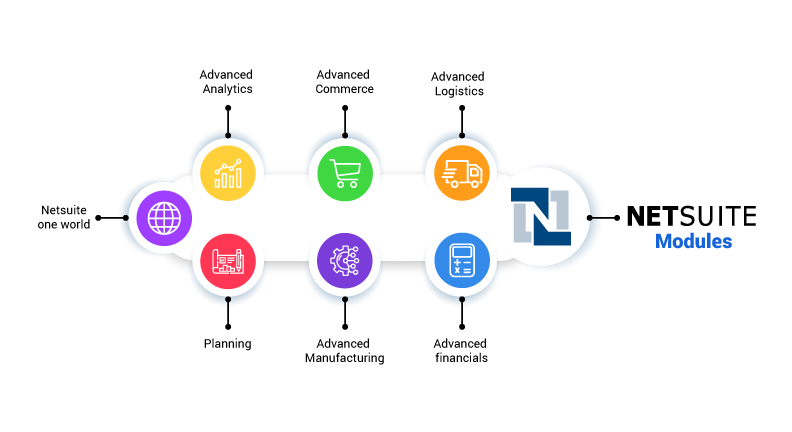
These modules are available as pick-and-choose types. Also, NetSuite can bundle all the advanced modules and make it an Industry Suite package for you. These are pre-planned packages that are made for the specific industry set-up. For example, manufacturing, healthcare, etc.
NetSuite can be highly customized depending on your company’s requirements. You can select a manufacturing industry suite and blend it with specific Advanced modules to make it extremely useful for your organizational purpose.
NetSuite’s modular design also enables companies to configure the solution to suit their needs. Instead of having to pay for features they do not use, companies can simply add the modules they need.
Some of the main categories of modules include advanced financial management, supply chain management, manufacturing, and analytics. Industry-specific modules are also available to help companies integrate the ERP solution with industry-specific requirements.
Since the use of modules is usually done in phases, companies can start with the basic ERP solution and then gradually add the modules they require.
Advanced Modules That You May Require are given below:
Financial Management System (FMS)
1. Fixed Asset Management
2. NetSuite OneWorld
3. Advanced Financials
4. Advanced Revenue Management
5. Multi-book Accounting
6. Suite Billing
7. Planning and Budgeting Cloud Services 9PBCS)
Inventory Management and Manufacturing
1. Advanced Inventory
2. Advanced Procurement
3. Warehouse Management
4. Work Orders
5. Assemblies
6. Manufacturing WIP and Routing
7. Advanced Manufacturing
8. Demand Planning
Service Resource Planning
1. Project Management
2. Resource Planning
3. Job Costing
Human Capital Management
1. Premier Payroll Service
2. SuitePeople
Retail Management and E-commerce
1. SuiteCommerce Standard
2. SuiteCommerce Advanced
3. Suite Commerce Instore
4. Advanced Order Management
Step 3: Identify the Requirements of Advanced Modules for your Business
Suite Commerce – Pricing
NetSuite offers businesses three comprehensively integrated solutions for E-commerce related services.
1. NetSuite Site Builder
2. SuiteCommerce Standard
3. SuiteCommerce Advanced
The best part of these three solutions is that they are not distinct. That means you need not get these products as a stand-alone entity. It is connected to the ERP as you subscribe to any package. It is not only connected to the ERP but also to the CRM.
SuiteCommerce Site Builder
This is the pioneer of E-commerce solutions. It came into existence even when mobile devices did not have appropriate applications for online shopping. The product has been in the market for over 10 years, and right now it is not suggested to use the same. In fact, NetSuite by itself does not recommend this product. Mainly because it is not SEO friendly and the product is getting obsolete.
SuiteCommerce Standard
The product that replaces the Site Builder is SuiteCommerce Standard. Ideally, if you have a limited product and a simple catalogue, this is highly recommended for its excellent interface and easy checkout process. It is a SaaS-based solution that is connected to the CRM as well as ERP solutions in NetSuite. One may also notice that the SuiteCommerce Standard has limited features, and customization factors are pretty limited. It is quite obvious that one may want to upgrade to SuiteCommerce Advanced if prolific customisations are required.
SuiteCommerce Advanced
This is an ace solution for e-commerce-based solutions. You have numerous customization features. A customer can sell through many channels and use different currency transactions, too. This is an advanced version and is completely SEO-friendly too. If your product catalogue is more complex and has different categories, this would be the ideal platform. At the same time, you can also offer your customers customized checkout options as well. Experience matters for the customers, and SuiteCommerce Advanced is a powerful platform for the same.
NetSuite Open Air – Pricing
Open Air is a complete platform for Professional Service Automation. This is widely accepted by many customers, as you can automate every process in your organisation when it comes to task force management. Open Air offers
1. Accounting of the Projects
2. Project Management
3. Resource Management
4. Time Sheets
5. Expense Sheets
This is also integrated with the NetSuite base package, and it has pre-enabled connectors with
1. SAP
2. Oracle
3. Microsoft Project and
4. Salesforce
NetSuite Open Air has a different look and feel than the SRP. As such, SRP is an indigenously built product while Open Air is an acquisition.
Recommendation: Please connect with an Open Air expert and check if your organization requires such services to be used in the first case. The pricing depends on the functionalities, and it is recommended for curbing the wastage of funds.
NetSuite Service Resource Planning – Pricing
Both Open Air and SRP are cloud-based. They are quite similar to each other in functionality, yet differ in key areas. They are
NetSuite SRP has the following advanced modules
1. Project Management
2. Resource Planning
3. Job Costing
One must also understand that the base package already has a Project Management tool; however, the features are far more limited compared to those offered in SRP. Also, you can subscribe to each module separately.
This is not integrated with NetSuite. That means to say, you need a connector to integrate it. A few Products are not integrated and require a connector; one of those is NetSuite SRP.
One more difference between Open Air and SRP may help you decide which one you would like to subscribe to. Open Air is a platform designed for large corporations and complex transaction features. While SRP is constructed and designed, if your professional service automation does not require robust options. If you are planning to run automation services on a single platform, then SRP must be your choice.
NetSuite Pricing Per User
As for the licensing cost per user, NetSuite pricing models come as either concurrent licensing or named user licenses. For end-users, NetSuite offers the “named user” model.
A specific user license is needed for several enterprise roles like Operations Head, Controller, Sales Manager, Customer Support Professional, etc.
Any user using the NetSuite system on a regular basis needs a full user license. Apart from this, there are also user licenses for people carrying out limited tasks.
NetSuite Pricing For Small Business
The story in the past was different when only large enterprises opted for NetSuite. The smaller players did not encourage the services as it was expensive. But the trend has changed. With the price getting a lot more cost-effective and the features being extravagant, small businesses are nonchalantly looking for NetSuite’s services.
As such, NetSuite was offering services to Small and Medium-sized Businesses in the beginning. It was called Oracle Small Business Suite then. The package offered was low and sold to organizations that had limited needs. The customer base increased, and the product upgrade and versatility attracted large corporations. This happened between 2012 and 2016. So, as per the product upgrade, the price also started increasing, which made the SMBs voice out that it was expensive. However, when Oracle acquired NetSuite, the game plan changed. The price came down, and the product was developed to be customized for the niche.
Earlier, small businesses used to stay away from NetSuite because of the expensive price tag and offerings that were targeted mostly to large companies. This scenario was changed when Oracle took over NetSuite and came with a specific small business suite packaged with solutions and priced accordingly.
NetSuite continued to come up with lucrative packages for emerging enterprises and small businesses. NetSuite also came up in recent times with a multitude of starter packages with befitting price points and flexible options.
The exclusive small business package, like the starter package with incredible features, is of top class. The flexibility in bringing in customization with any amount of advanced modules makes the Suite the most sought-after.
Contract Duration
NetSuite works in contract mode. As with any subscription, there is a timeline involved in the services. Be it the package, the license, or the module. All must be included in the contract with a specific timeline. The base package is the foundation, so the other licenses must have a time frame of less than or equal to the duration of the suite.
Step 4: Choose the Contract Period
The preliminary tasks of setting up NetSuite are over. Now comes the major part of the journey, which is called the implementation phase. This incurs separate costs depending on the requirements, business complexity, time duration, and any other operational challenges while setting up the system for your organization.
NetSuite Implementation Cost
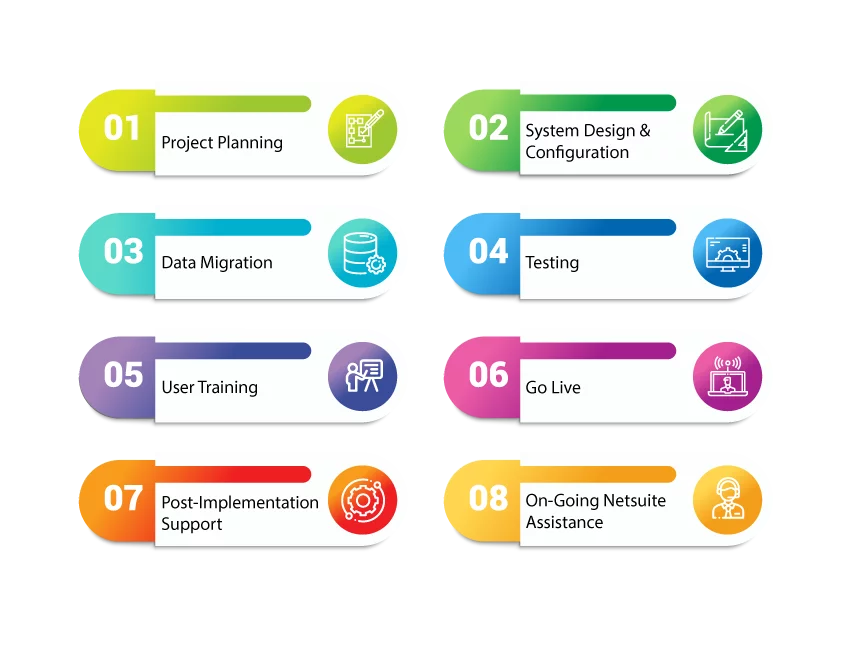
The cost of implementing NetSuite is a one-time investment, which varies depending on the project’s scope, the number of users, the modules used, and the extent of customization needed. In the case of NetSuite Pricing 2026, the implementation of the system has to be seen as a variable cost depending on the complexity, the time taken to implement, as well as the expertise of the partner used in the implementation process, which entails discovery workshops, configuration, integration, training, and go-live support, among other factors.
Stage 1: Requirement Discovery
The implementation of NetSuite begins with a discovery of requirements. Consultants assess existing business processes, reporting needs, and scalability requirements. This stage results in an implementation roadmap and is crucial in the latest NetSuite ERP pricing guides, as it helps prevent scope creep and control future implementation costs.
Stage 2: Design and User Acceptance
This is a crucial stage, and it is recommended to spend a lot of time with the implementation team during this period. This is the step that helps the team configure the requirements and offers solutions with various advanced modules, too. This is the stage where your requirements meet the solutions. Also, the configuration is tested. Only after the user acceptance, the process go to the next stage. You may also have the training to get familiar with the tools and understand their functionality as well. Any type of customization is done during this stage and is also tested alongside.
During the design process, you may require customisations to happen. This is of paramount importance for you, as it addresses the prime gaps that NetSuite has in offering services to your organization. You can talk to the consultant to build a custom automation for you. As such, NetSuite offers services to a particular business need, too. NetSuite approaches this in two distinct ways
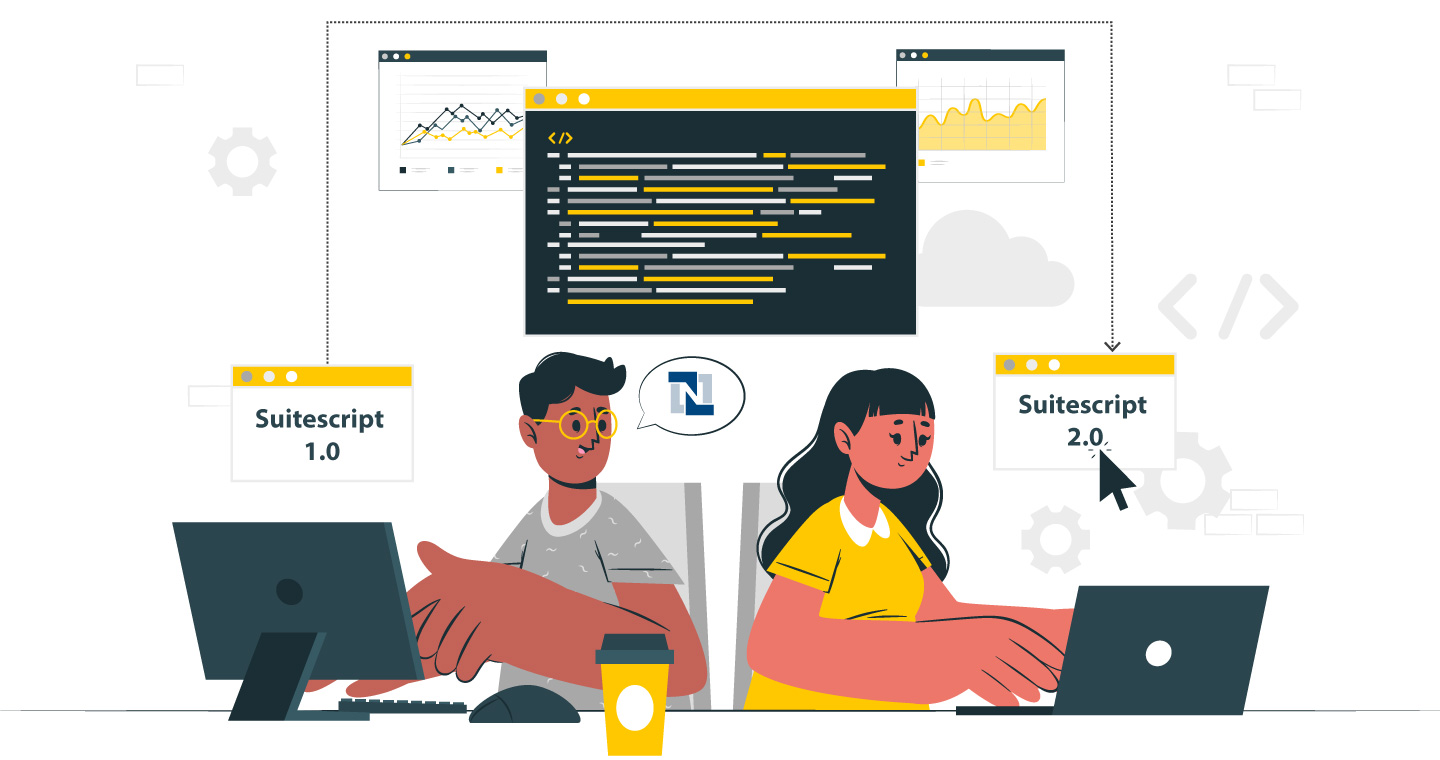
SuiteScripting: If you are looking for a completely new application to automate a particular process, the developers will help you get that done.
SuiteFlow: This is for non-tech people who would like simple drag-and-drop automation services without any coding involved.
Recommendation: Allocate extra funds for this customization process. Though NetSuite is comprehensive and robust, different businesses have different needs and challenges to be addressed. That requires customization, and it happens through professional help, and it does not come for free.
Stage 3: Integrating the ERP Platform
The system is integrated with your workforce. Appropriate training would be offered department-wise. Hands-on experience with the tools can be of immense help. At the same time, full user licenses and critical licensees are given separate training. While this happens simultaneously, the data migration process happens. That means to say, as you complete your training, the system is ready with all the features, and your company is under NetSuite’s guidance and support for most of the key functionalities.
You must also be aware that training is an ongoing process, and every time there is an upgrade, training must happen.
Recommendation:
1. During the Requirement and Discovery stage, you will have NetSuite Consultants either visiting or connecting with you virtually to understand the business. The consulting fees typically depend on the expertise of the consultant. If you find anyone charging less than this, you may right away understand that the consultant is not as experienced as the one you wanted.
2. You can also cut down on requirements and discovery costs by talking to the consultant about a turn-key approach for your organization to implement NetSuite. This might save a lot of money and time.
Custom Implementation
NetSuite offers a lot of scopes for customization, and they are very helpful for automating the processes and bridging the gaps with standard NetSuite features. In terms of NetSuite customizations, customers generally have two broad options: SuiteScripting and SuiteFlow.
SuiteScripting helps developers to develop flexible and highly customised business logic for a tailor-fit NetSuite implementation as per specific business needs. SuiteScripting helps to automate business processes or to program completely fresh new apps for the business.
SuiteFlow, on the other hand, helps users without a technical background to create easy-to-interact workflows that allow drag-and-drop and point-and-click actions and give complete freedom from coding.
Most industry experts suggest that companies should set aside a considerable budget for customization. Though NetSuite is all-encompassing and comprehensive enough for the vast majority of companies, there are many instances where business-specific needs can only be addressed with customization.
Step 5: Implementation Process
Cost for Integration
NetSuite can be readily connected with any leading application. Thanks to the design style right from the beginning, as extensibility was the prime motto behind the construction of the platform. The three major options for connecting NetSuite with other applications are:
1. SuiteScript | Suite Talk
You can connect legacy services with NetSuite. SuiteTalk enables the integration of Web 2.0 tools that help in adding blogs, maps, or even messaging services. Though it is available with any basic package, there is a cost involved in designing, building, and maintaining the services as per the requirements.
2. NetSuite Connectors
There are ready-made applications available for you to connect any application to NetSuite. The application functions in a plug-and-play mode, which makes it ideal for any business to use, even if you do not have technical knowledge. Moreover, these connectors are offered by third-party vendors, and you can get them for monthly or yearly subscriptions. It may cost you a few hundred dollars to subscribe to such plans.
3. IPAAS – Integration Platform
Integration planning has a major impact on the cost of implementing NetSuite. Organizations need to integrate NetSuite with other tools like CRM, e-commerce, payroll, or data warehouse solutions using middleware tools or connectors. The complexity of these integrations, the frequency of data synchronization, and security concerns have a major impact on the time and effort taken during the implementation, which has a direct impact on the cost of the implementation.
Depending on the complexity of the integration, the solution can be subscribed to.
This is the most robust integration method and is expensive too. The NetSuite space has the following solutions:
The flow of action is seamless, and you can sign the contract just after Stage 2 of the Implementation process. As that is the stage where both teams can come to a mutual consent as to what is required and what is not. By then, you could have selected the number of licenses as well as advanced modules, too.
Total Implementation Cost
The total cost of implementation of the system varies greatly depending on the size of the business and the complexity of its operations. For smaller teams, it may involve a simple setup, while enterprise-wide deployments, especially for global businesses, require more extensive work. Costs are generally proportional to the number of licenses and level of customization, making implementation a variable factor in most NetSuite pricing calculators.
Additional Services Offered by NetSuite
Additionally, organizations looking for the best NetSuite Pricing 2026 should also consider optional services that provide long-term system performance as well as adoption benefits. These optional services extend beyond the implementation services.
24/7 Technical Support
NetSuite offers free customer support. If you are planning to convert that into 24/7 support, then you may have to upgrade the plan. NetSuite Support price depends on the contract value. Alternatively, you can also connect with the service provider for your technical needs. Of course, there is a cost involved for that, too.
Advanced support tiers provide faster response times, proactive monitoring, and dedicated technical resources. Businesses with mission-critical operations or high transaction volumes often opt for enhanced support packages to ensure system continuity and performance optimization.
Funding Initiatives
NetSuite Service providers offer finance options for subscribing to any NetSuite package. Of course, the credit history of your company must be healthy for the service provider to take the request. You can also negotiate on the monthly payment plans and continue using the services offered by NetSuite.
Suite Success
It is a product offered for businesses to run live with NetSuite. The product comes with loaded KPIs and reports that are customized for your business. You can check with your consultant if your organization requires this product.
Different Service Tiers
Especially for large corporations, NetSuite offers exclusive services in terms of database storage as well as flexibility in receiving updates. To gain greater control, and if you are looking at scaling at a massive rate, you can opt for NetSuite Premium tier plans. It is divided into 4 types, and you can opt for the best-suited plan.
1. Tier 3
2. Tier 2
3. Tier 1
4. Tier 1+/0
Additionally, if your business always has high traffic, then go for the SuiteCloud Plus license.
Billing Norms
NetSuite follows a subscription model, wherein the contract may be annual or for longer durations. The pricing structure may differ based on the terms negotiated, user count modifications, and the addition of modules to the contract. Contract flexibility is an important factor that needs to be considered while estimating the long-term pricing of the NetSuite license.
NetSuite Implementation, Optimisation, and Customisation are completely based on your requirements. At the same time, the automation of critical and non-critical tasks will save a lot of time and energy. Also, the employee productivity and incredible inventory management, along with a finance tracking system, make the software the most needed one. Every step in this article requires you to give deep thought, as it involves cost. The duration, contract, and discount factors need to be pondered upon to arrive at the right cost structure.

Conclusion
As adopting an ERP system becomes a strategic decision, understanding NetSuite Pricing 2026 goes beyond just the costs. It is equally important to see how the technology aligns with your future business goals. Many organizations struggle to estimate pricing accurately, define the scope of implementation, and assess the effort required, which can lead to unexpected costs.
It is essential to consider pricing in full, based on actual business needs rather than assumptions. If you are planning to implement NetSuite and want a clear, cost-efficient roadmap, connect with the experts at VNMT Solutions on LinkedIn to gain guidance from industry specialists.